Sophie™ • Breakout category

AQS-Support Resistance BreakOut PRO

A support/resistance breakout Expert Advisor for MetaTrader 5 that places disciplined pending stop orders beyond identified levels, with strong controls for spread, duplicate orders, day limits, and execution hardening. Designed for systematic deployment across FX pairs and major indices.

Buy on MQL5 – Pricing, live stats & reviews Read our testing standards
Built for difficult execution environments AQS strategies are researched and validated under conservative execution assumptions (including higher-friction conditions such as wider spreads and adverse swap profiles where relevant). The goal is robustness, not idealised backtests.

S/R breakouts with execution discipline

Levels are computed internally (no external indicator dependency for maximum efficiency) and entries are placed only when spread, distance-to-price, and duplication checks pass. Optional OCO logic removes the opposite side after a fill.

AQS Support Resistance BreakOut PRO
Market
FX / Indices
Timeframe
Best for M30 / H1
Style
BreakOut
Risk Control
Defined SL / TP - Optional trailing
Best Use
Multistrategy portfolio component
How it trades
Levels Detect key support/resistance zones
Trigger Breakout confirmation + distance rules
Entry Place BuyStop / SellStop with safeguards
Risk & exits SL/TP + trailing / breakeven + exposure caps
Rule-based Breakout discipline Broker-aware safety

Trading logic summary

  • Market structure: identifies recent support/resistance levels and validates relevance.
  • Entry: uses pending stop orders only when breakout conditions and minimum distance rules are met.
  • Execution controls: spread/slippage filters, stop-level compliance, optional time/session rules.
  • Risk management: predefined SL/TP with optional trailing and protective logic.
  • Exposure limits: caps open positions per side and can cancel opposing orders to reduce conflict.
Important note
Our models are continuously monitored in live conditions and are recalibrated when market dynamics change. When an update is required, the recalibration and release notes are shared transparently with our community through our official channels.

Key strategy features

The diagram below illustrates how AQS-SupportResistanceBreakOut PRO identifies key support and resistance zones, validates breakout conditions, and executes rule-based entries with integrated risk and execution safeguards. This illustration is intended to visualise the decision flow and operational logic, not to represent historical or live performance.
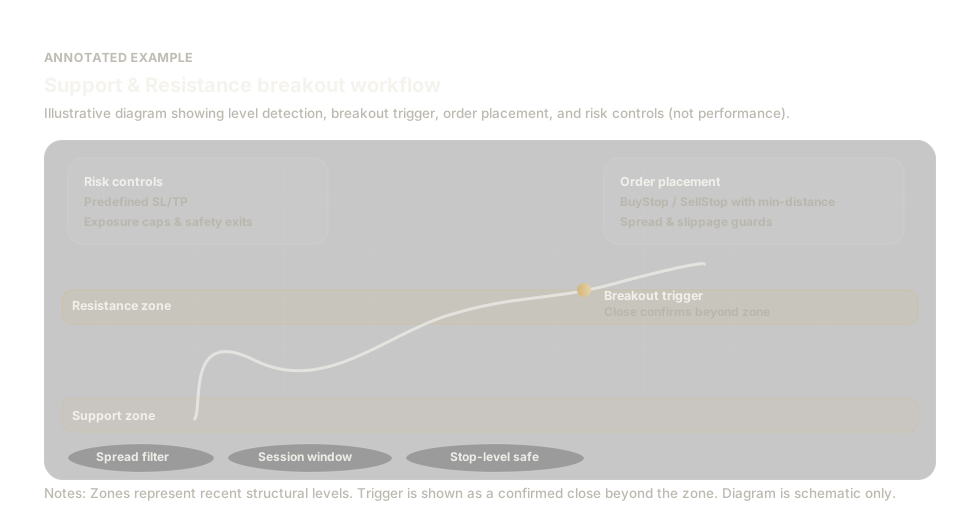
Illustrative annotated example of support and resistance breakout detection, order placement, and risk controls
  • Level identification: recent structural support and resistance zones are detected and validated.
  • Breakout confirmation: price must confirm beyond the zone with minimum-distance rules applied.
  • Order execution: BuyStop / SellStop orders placed with broker-aware constraints.
  • Risk & safeguards: predefined SL/TP, optional trailing logic, exposure caps, and spread/session filters.

Why this approach?

Many S/R breakout systems fail operationally due to over-trading, duplicated pending orders, spread spikes, or broker constraints. AQS-SuppResBreakOut PRO is designed to behave like a production-grade tool: it filters, caps, and hardens execution.

Pending-order discipline

  • Entries are placed as BuyStop above resistance and SellStop below support.
  • Configurable breakout buffer and optional offset.
  • Duplicate-order tolerance prevents “stacking” similar pendings.

Internal S/R (recommended)

  • Internal S/R calculation from a lookback window (no iCustom dependency).
  • Optional external indicator support for advanced workflows.
  • Designed for portability across symbols and brokers.

Operational filters

  • Spread filter (skip if spread exceeds threshold).
  • Minimum distance from current price (avoid instant fills / noise).
  • Pending caps per side to control exposure.

Risk controls & hardening

  • ATR-based SL/TP (optional) plus volatility-aware sizing (optional).
  • Broker stop-distance enforcement and freeze-level awareness.
  • Optional OCO: when one side fills, opposite-side pendings are removed.

How it works

The EA identifies support and resistance levels, then places pending stop orders outside those levels only when execution conditions are acceptable. It also includes day-based trade caps and cooldown logic to keep behaviour controlled.

01 Detect support & resistance
Levels are computed internally over a configurable lookback (recommended) or optionally sourced from a custom indicator.
02 Validate execution conditions
Spread, distance-to-price, pending caps, and duplicate-order checks are applied before placing any pending orders.
03 Place breakout pending orders
BuyStop is placed above resistance; SellStop is placed below support, using buffer/offset settings to reduce false triggers.
04 Manage fills, risk, and exposure
Optional ADX filter, ATR-based stops/targets, trailing stop logic, and OCO cleanup are used to manage open risk and reduce operational noise.

Key features

The feature set focuses on practical execution: controlling trade frequency, avoiding poor fills, and keeping risk behaviour stable.

Signals & level logic

  • Support/resistance from lookback window (SRPeriod).
  • Breakout buffer beyond level (EntryBreakBufferPips).
  • Optional trend confirmation: ADX (timeframe/period/min).

Exposure control

  • Daily cap: MaxTradesPerDay (synthetic UTC day optional).
  • Cooldown: MinBarsBetweenTrades based on executed entries.
  • Max pendings per side: MaxPendingOrdersPerSide.

Execution hardening

  • Spread filter: MaxSpreadPips (skip high-friction moments).
  • Minimum distance filter: MinDistanceFromPricePips.
  • Duplicate pending tolerance: DuplicateOrderTolPips.
  • Broker constraints: stops level & freeze level awareness.

Risk & trade management

  • ATR-based SL/TP (optional) with displacement buffer.
  • Volatility-aware sizing (optional): size scales inversely with ATR vs reference.
  • Trailing stop with failure handling.
  • Optional pre-trail partial close “risk cut”.
  • Optional OCO pending cleanup after a fill.

Configuration overview

Key settings are designed to be intuitive and operational. Full parameter details and presets are provided on the MQL5 product page.

  • Trade direction: Buy only, Sell only, or Both.
  • Daily trade cap: Limits the number of executed trades per day to control exposure.
  • Cooldown between trades: Enforces a pause between entries to reduce over-trading.
  • Support & resistance depth: Defines how far back price data is used to calculate key levels.
  • Breakout buffer: Requires price to move beyond support or resistance before triggering entries.
  • Spread filter: Prevents trading when transaction costs become excessive.
  • Optional trend filter: Allows trades only when market conditions show sufficient directional strength.
  • Stop-loss & take-profit logic: Fixed distance or volatility-adjusted exits.
  • Position sizing: Fixed lot or volatility-scaled sizing for consistent risk.
  • Trailing management: Locks in profits once trades move favourably.
  • Optional risk reduction: Can partially reduce exposure if price moves against the position early.

Performance, pricing, and delivery

We recommend keeping strategy-specific performance statistics, pricing, and delivery details on the MQL5 product page, where users also receive licensing, updates, and feedback visibility. This website focuses on methodology, positioning, and product clarity.

Where to find the key numbers

  • Backtest statistics and reporting screenshots
  • Inputs, presets, and recommended usage notes
  • Pricing, licensing model, and version updates
Link to MQL5 (pricing & stats) not yet active. Product under final validation. Follow us on our channel for updates.

Important note

Our models are continuously monitored in live conditions and are recalibrated when market dynamics change. When an update is required, the recalibration and release notes are shared transparently with our community through our official channels.

Contact AQS support

Research updates

Follow AuroraQuantSystems for methodology notes, development updates, and new production releases.